Shared context
Decisions, rules and boundaries live in one Project Contract. A new agent starts from the same facts instead of asking again.
 FluidMPC
native
FluidMPC
native
Local MCP server / 21,505 reasoning cells / one control plane
FluidMPC holds the catalogue, scores it against the task in front of your agent, and installs only what the evidence supports. The optional workspace adds one MCP connection for the Project Contract, reviewed integrations and a human approval before anything reaches production.
Your agent should not choose between twenty MCP servers and a twelve-page tool dump. One endpoint gives it the capability it needs, the decisions you already made, an executable procedure and a place to stop until you approve the exact production action.
Add one stdio server to Codex, Claude Code, Cursor or Claude Desktop. No second entry for skills, context or pipelines.
fluidmpc-native --mcp
Frontend, database, accounts, billing, deployment and the rules that never change, held once for every agent.
get_project_context
Validation, executable skills and browser checks run in order. Each step records its result instead of disappearing.
run_pipeline
Production pauses. You see the target, the action and the risk, then approve or reject the exact change.
request_approval
Decisions, rules and boundaries live in one Project Contract. A new agent starts from the same facts instead of asking again.
Every integration lists the permissions it would request. Nothing connects until you review and confirm each one.
Procedures carry the questions to ask and the checks that prove the work, so agents follow the same method every time.
A production deliver is refused unless an approval exists for that run. Rejecting stops the pipeline cleanly.
Inputs, steps, durations, browser results and the person who approved it — the record survives after the run ends.
Run validation and QA on a cadence. Scheduled runs still stop at the same gate before production.
Nothing reaches production without an approved run.
A message is readable only by members of its workspace.
The catalogue and the second brain stay on your disk. The workspace is opt-in: it stores the contract, integrations and run history so the same project works from the desktop app and the browser.
A catalogue is only useful if something narrows it. FluidMPC narrows it per task, in order, and shows its work at each step.
Installed is active. Thirty-four presets stand as doctrine — mission, verification, minimal change, comprehension — and any of them can be muted per workspace when the task is not about code.
route_task hands the task to the local router. Laya,
an optional self-hosted model on loopback, adds a field of view:
task type, complexity, tool need, security sensitivity. The
catalogue adds the evidence — lexical and latent-concept scoring
over every cell.
One RoutePlan: primary picks with the exact words
that matched, an adjacent pool of weaker but real evidence, the
funnel counts, and the reason it stopped at sixteen. The agent
states what it took and why, then leaves the rest unused.
run_skill returns a cell's working instructions — the
checklist, the failure modes, the order of operations. Your model
does the reasoning. FluidMPC never pretends to.
The MCP server is the product. The deck is how you curate it: every figure printed in it is measured from your own rows, and a figure that does not exist is an em dash — never a zero, never a sample.
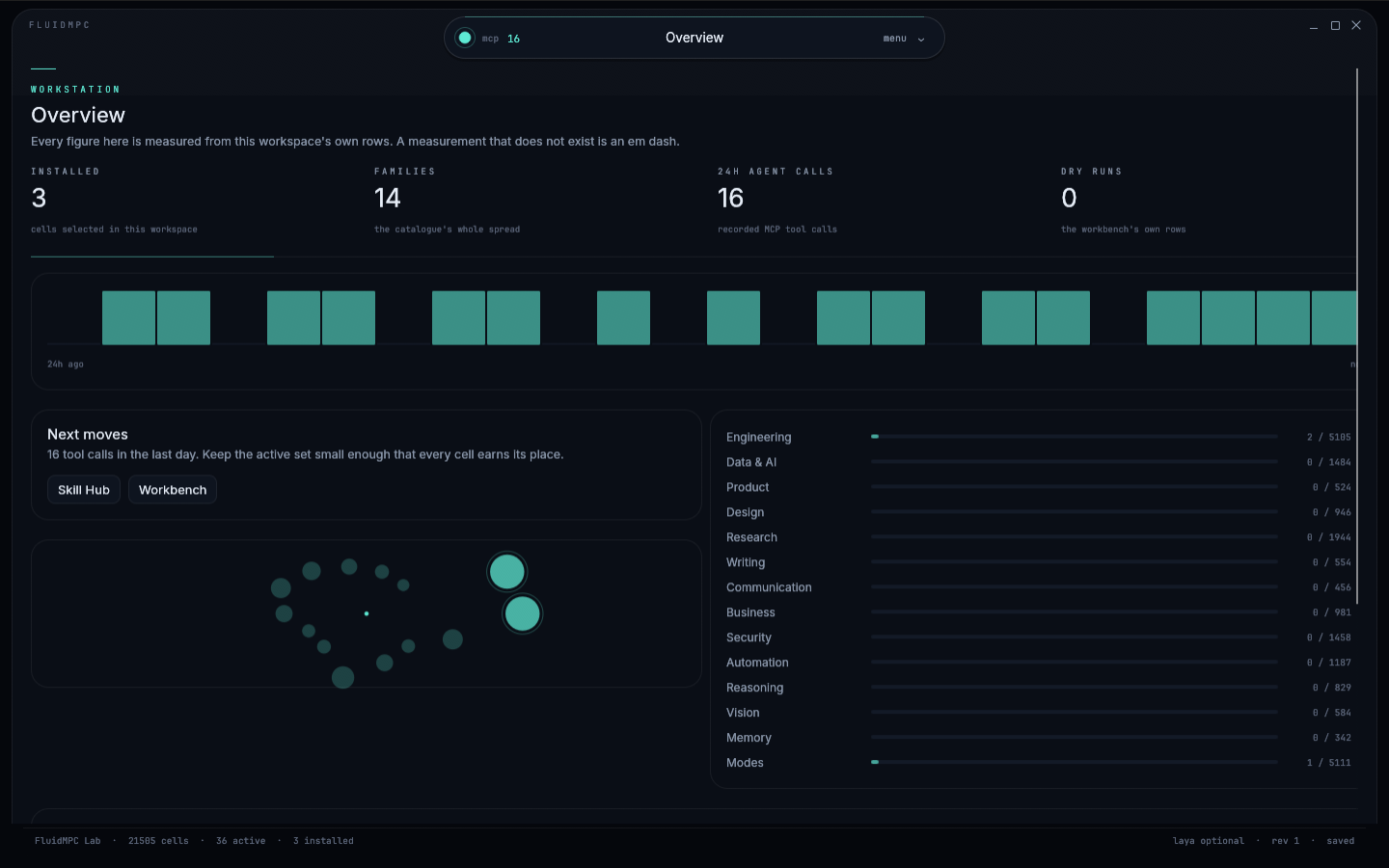
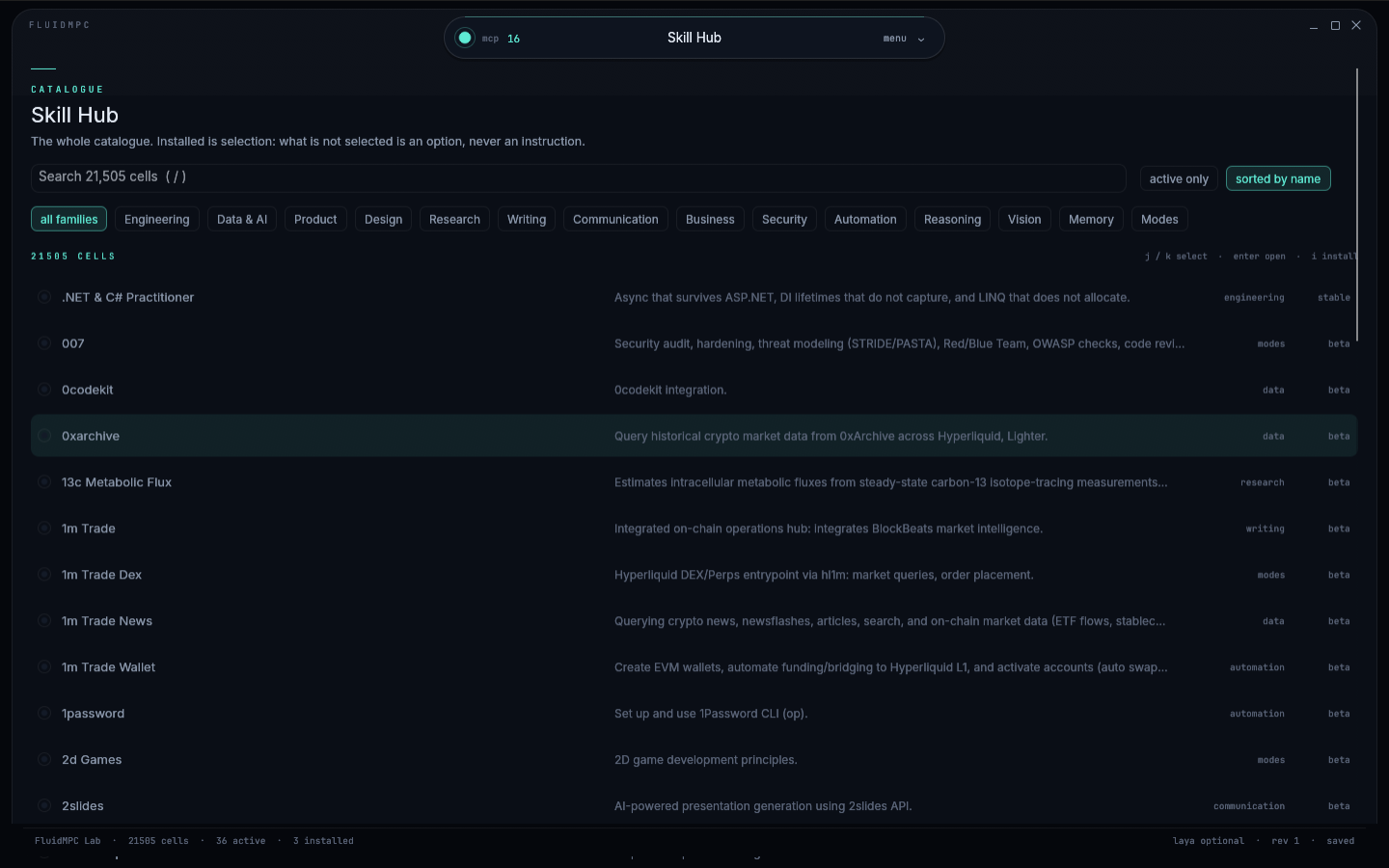
The frame is a single floating island that opens downward, never wider. Your window is the screen.
ctrl k for the palette, / to search, j/k to move, i to install, ? for the rest.
Sample rows are labelled, and excluded from your measurements. A dry run says it is a dry run.
The catalogue is reference data compiled into the binary: public, versioned, and installed with its notices. Hover a family to see what it is for.
Build, ship and operate software: languages, frameworks, tests, infrastructure and the review before merge.
How the agent operates: mission discipline, reading the room, and the rules that hold work to its instruction.
Find, triangulate and cite — and say what the evidence does not support.
Numbers, pipelines and models: schemas, metrics, analytics, training, evaluation and inference.
Audit, verify, redact and probe before anything leaves the building.
Triggers, retries, integrations and agents: the plumbing that runs without a person watching.
Interface, visual and interaction craft: hierarchy, tokens, states, accessibility and brand.
Commercial facts: pricing, revenue, contracts, marketing, sales, hiring and operations.
How an agent argues with itself: assumptions, alternatives, critique, calibration and the decision record.
Read images, charts, screenshots, documents and video — and mark what the pixels do not settle.
Prose, documentation and the edit that makes a reader act: structure first, then sentence, then voice.
Discovery to spec: the problem, the scope, the proof of done and the plan that ships it.
Email, meetings, decks and the update that reaches the person who has to decide.
Context budgets, recall, provenance and the facts worth carrying into the next session.
Thirty-four presets are active in every workspace. They are the difference between an agent that finishes a job and one that reports progress. Mute one — it stays in the catalogue, it just stops instructing this workspace.
Installed cells are how you add to that baseline. Presets cannot be uninstalled; only muted.
The window and the server write the same workspace. That is the whole architecture problem, and it is solved rather than hidden: a lock, a three-way merge, a revision counter, and a damaged file moved aside instead of overwritten.
{
  "schemaVersion": 2,
  "revision": 26,
  "name": "FluidMPC Lab",
  "installed": [{ "skillId": "mission-complete" }],
  "notes": [{
    "id": "note_1a16ee2a1e6a",
    "title": "Dynamic island",
    "body": "One capsule, opened downward.\nBuilt on [[FluidMPC]].",
    "tags": ["interface"],
    "stub": false,
    "updatedAt": 1792854507699
  }],
  "runs": [{ "status": "success", "completion": 100 }],
  "mcpCalls": 22,
  "appearance": {
    "accent": "phosphor",
    "theme": "phosphor",
    "density": "comfortable",
    "customThemes": []
  }
}
Notes are nodes, [[links]] are edges, a missing title
becomes a stub. One file, held by one lock, merged by revision.
A lock file holds each read-modify-write. A lock older than five seconds is reclaimed.
Installs and runs from both sides survive; a removal applies to the other side; the newer edit wins a note conflict.
The previous generation stays as .bak, writes go through a temp file and a rename, and an unparseable file is moved to workspace.corrupt-…json.
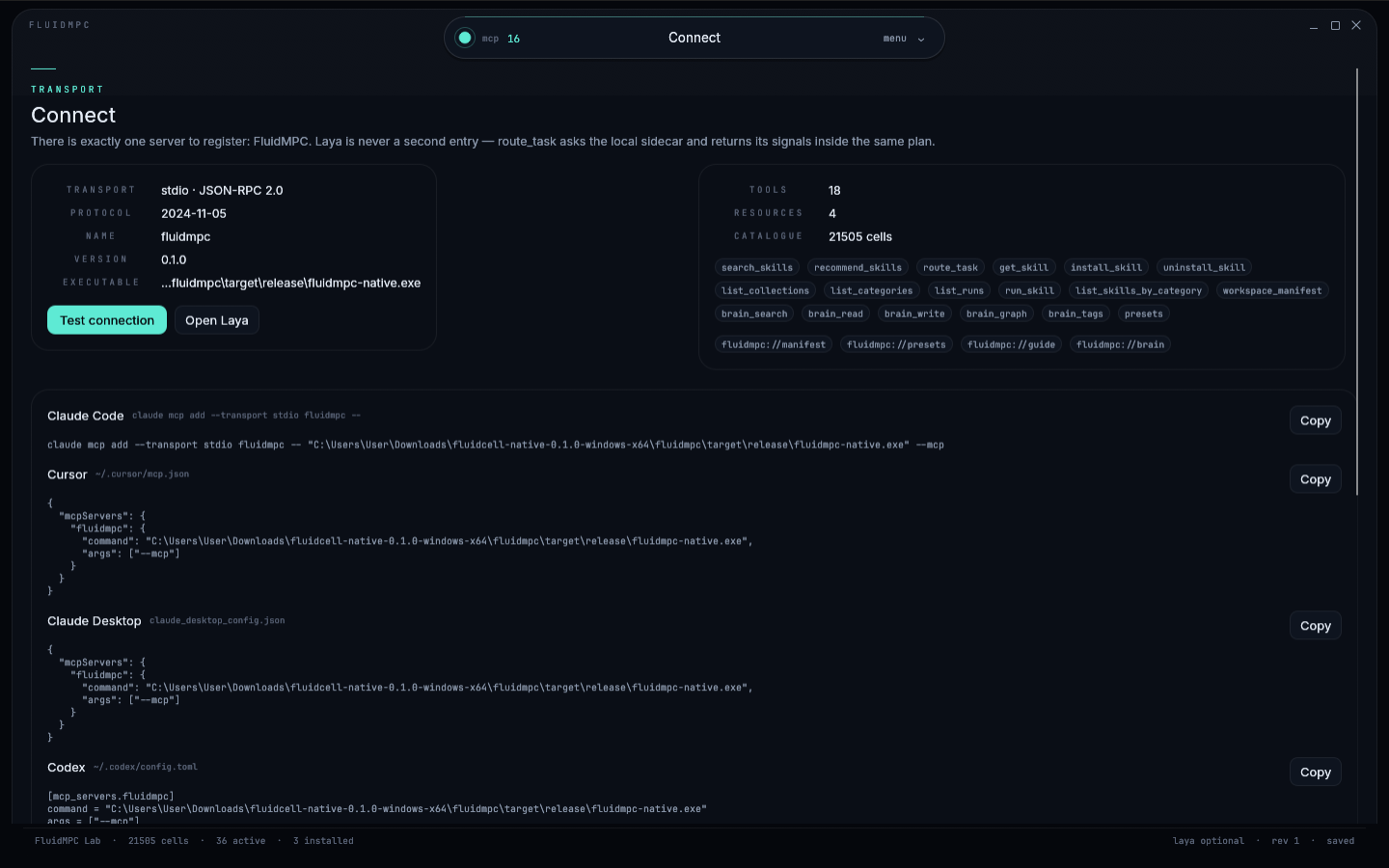
Eighteen tools, four resources, JSON-RPC 2.0 over stdio. Laya is never
a second entry — route_task reaches it for you and returns
its signals inside the same plan.
{
  "mcpServers": {
    "fluidmpc": {
      "command": "fluidmpc-native",
      "args": ["--mcp"]
    }
  }
}
Started with --mcp it draws nothing. Started normally it
opens the deck. Same binary, same workspace, one lock between them.
The Connect screen launches the binary, runs initialize
and tools/list, and reports protocol, version and tool
count — so a broken client is diagnosed before an agent sees it.
No runtime, no account, no telemetry. Install it or unpack it, run it, register the server. The catalogue and the fonts are compiled in; Laya stays an optional sidecar you host yourself.
Verify either file against SHA256SUMS.txt.
Windows may show SmartScreen because this build is not code-signed.
Linux and macOS builds are compiled on their target platform from the
same crate; the scripts are in fluidmpc/installer.
Rust 1.85+, edition 2024. Fat LTO, one codegen unit, symbols
stripped — hardened, not encrypted. Windows, Linux and macOS
installer scripts are in fluidmpc/installer.
cd fluidmpc
cargo build --release --bin fluidmpc-native

# Windows helper
build.bat

# Linux / macOS installers
installer/build-installer-linux.sh
installer/build-installer-macos.shThe catalogue is local and free. The workspace adds accounts, shared context, reviewed integrations, scheduled pipelines and the approval gate. Every plan is free while the control plane is in early access.
For your first connected project.
For the products you are building.
For a complete release loop.
Billing is not active. Plans and limits exist so the shape is honest; nothing is charged during early access.
A native desktop instrument and an MCP server for the skill catalogue, plus an optional control plane for the decisions, integrations and pipelines around a product.
No. The catalogue, router, second brain and MCP server work entirely offline. An account only adds the shared workspace and desktop sync.
A pipeline that would deliver to production creates an approval request with the target, the action and the risk. The run pauses. Nothing continues until a person approves it, and a rejection stops the run cleanly.
Codex, Claude Code, Claude Desktop, Cursor or any MCP client that speaks JSON-RPC over stdio. One server entry reaches the catalogue, the workspace tools and the pipelines.
The catalogue and second brain stay in the workspace file on your disk. The hosted workspace stores projects, contracts, integrations, runs and approvals in D1, scoped to your Freebuff account.
The release notes for the control plane and the desktop instrument. Newest first; every entry links to the screen that shows it.
The workspace overview now takes a request directly: type / for a pipeline, @ for an integration, or a sentence to get a route plan with the capabilities that match and the context still missing. The MCP server grew to 29 tools, including get_project_context, contract writes, approvals and pipeline runs that sync to the same account.
Sign in with Freebuff, create a project, and link the desktop app with a workspace token. The contract and pipelines are shared; runs and approvals land in the same history.
A run that would deliver to production now creates an approval request and stops. The approver sees the exact target, action and risk; a rejection stops the run cleanly.
Build a pipeline from context, validation, skills, review, approval and delivery steps. Browser checks fetch the deployed page and assert status and content.
Frontend, database, accounts, billing, deployment, permanent rules and open questions in one editable contract, loaded by every agent.
Sixteen integrations list the permissions they would request. Nothing connects until every scope is confirmed, and disconnecting is always available.
The same four themes ship with the desktop instrument. Pick one, or build your own token set — it is stored in this browser, never sent anywhere.